
Special Offer: WebWrench™ $199 & $50 off SearchWrench™!

How To Automate Your Business Using Zapier
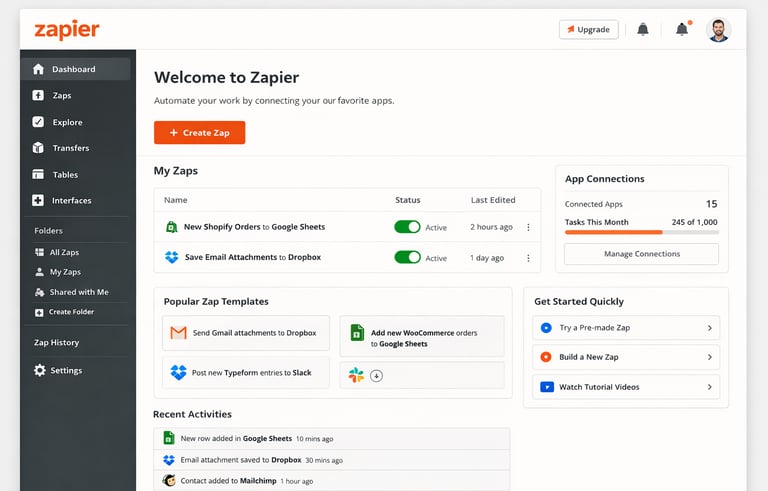
Small businesses run on time, communication, and organization — but manual tasks can eat all three. Zapier helps you automate repetitive work by connecting the apps you already use, with no coding required.
How Zaps Work
A Zap is a simple workflow:
A Trigger starts it (like a missed call, new text message, incoming email, or a form submission)
An Action follows automatically (like logging info into a spreadsheet, saving files, or sending a message)
Setting Up Your First Zap
Click “+ Create Zap” in the editor
Choose your Trigger app (Gmail, SMS service, phone system, spreadsheet, etc.)
Select the event that starts the Zap (new message, missed call logged, attachment received, etc.)
Choose your Action app — where the data or task gets sent
Press Test, then toggle the Zap ON
You can organize Zaps into folders like:
Customer Messages
Orders & Receipts
Internal Alerts
Promotions
Follow-Ups
Useful Ways Small Businesses Use Zaps
Phone & Text Message Automation
Zapier works with phone and SMS platforms that support message alerts or call logs. You can:
Record missed calls into a spreadsheet
Log inbound text messages
Flag messages that contain keywords like urgent, emergency, reservation, order, or after-hours
Send automatic thank-you texts or follow-up messages
Notify business owners when important calls or messages come in
This is especially helpful for businesses that get high call volume but don’t want complicated systems.
Email and File Automation
Connect Gmail or Outlook to automate things like:
Saving attachments to cloud storage (Drive, Dropbox, etc.)
Logging email inquiries into a spreadsheet
Sending automatic replies when customers reach out
Forwarding filtered messages to a team member
Sorting incoming invoices, photos, or documents into storage or internal logs
This prevents lost files and keeps important conversations accessible later without manual downloading or filing.
Internal Business Alerts
Zaps can notify you when something happens in your business tools:
New lead submitted
Customer message logged
Order placed
File uploaded
Payment recorded
Task created
You can send alerts to Slack, Discord, email, SMS, or spreadsheets depending on what you check most often.
Seasonal Promotions & Customer Follow-Ups
You can automate promotional messages based on time or customer behavior:
Send recurring seasonal campaign messages
Trigger a follow-up message when customers use a promo code or keyword
Automatically log campaign responses or inquiries
Send small business offers like tune-ups, harvest deals, installation specials, or family-run shop discounts
The Value
Zapier gives small teams superpowers by handling:
Phone automation, SMS automation, missed call tracking, inbound message logging, document saving, customer follow-ups, seasonal campaign messages, internal alerts, cloud file organization, and cross-business workflows.
You don’t replace your business tools — you connect them and let them work together quietly while you focus on customers, craft, or products.
Contact
We offer free consultations, and are always here to answer your questions.
Phone
techwrenchsolutions@proton.me
541-256-1144
TechWrench LLC
© 2025. All rights reserved.